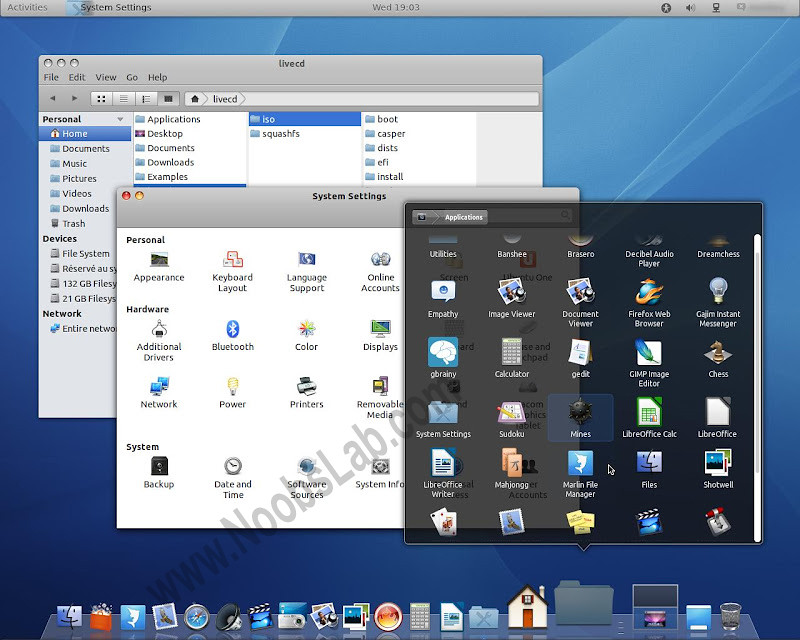
This is for those who are looking forward to Macbuntu 11.10, It looks cool and looks like Mac OS X.
Free OS X is based on Ubuntu Gnome. I haven't tried it yet So I can't say anything about this, It is good or buggy. You should try and after that you can write here your responses.
Free OS X alternative Macbuntu 11.10 is available only for 64-bit systems.
Here are Screen Shots of Fake OS X 11.10.
Note: Free OSX is not Available for 32-bit systems. (If you want to help with 32bit contact the project owner from bottom source link)
You can use UnetBootin to burn iso on Flash Drive.
1st Version:
Based on Debian/Ubuntu 10.04 LTS
Architecture : 64bit
Kernel : Linux 2.6.32-33-Generic
Desktop : Gnome 2.30.2
File browser : Nautilus 2.31.1
Web browser : Firefox 9.0.1
Ubuntu security updates until april 2013
Download Free OSX Ver. 2.2.6 ISO
2nd Version:
Based on Debian/Ubuntu 11.10
Architecture : 64bit
Kernel : Linux 3.0.0-12-Generic
Dekstop : Gnome 3.2.1
File browser : Nautilus 3.2.1 and Marlin 0.1
Web browser : Firefox 10.0.1
Ubuntu security updates until april 2013
Free OSX Ver. 3.1.2 ISO
----Update----
Project Owner changed the name from (Fake OSX) to (Free OSX)
Enjoy
Source: Free OSX


Umair


Posted in: 

31 comments:
Thank you NoobsLab, You are awesome
ooooh Umair you are grrrrrrrreat
Umair when it will available for 32bit?
@Anonymous
Well I don't know when Fake OSX will available for 32bit, If 32bit will release I will share.
Thank you
Simply one word for you "Awesome"
Damn this is not available for 32 bit. i don't have 64 bit pc/laptop
thanks
really cooooooll, thnx
where did the downloads go? they were on source forge last night, but today they are gone???
Fake osx3.11 was available last night, but there was a bug with one gnome-shell extension in some languages so we removed it for the moment to correct and complete full tests, the fk310 is now available again.
We apologize for the inconvenience.
The Fake OSX team
@Fake OSX team
This fake osx will available for 32bit system. I don't have 64bit system.
I installed the Fake OSX Ver. 3.1.0 ISO 3 times it does not work when you install the graphics driver...dont bother installing!!...its rubbish
@Anonymous
Fake OSX is only works on 64bit pc.
like i said this only works if u don't install the graphics driver 4 time i've tried now on my dell xps i7 2600k 64bit & ati 5870 graphics...it does not work with the graphics driver installed...
All is great so far Fake is def. going places...the logo SUKS especially at the login screen - Work on that. Anyway thats the only thumbs down rite now but hats off to you guys!
You should contact to Fake OSX Team to fix this. Fake OSX Source is available in topic
Umair you are the best, learning a lot from you site !!! :) THX
Installed Free OS X on Acer Aspire 5742. Works well. Looks great. Hope there's a version based on 12.04.
We can hope author will make next version.
You can find another installation of Free OSX at http://youtu.be/LuchffjkYrU
This macbuntu wont work after updating graphics.... THIS IS THE BEST macbuntu I've ever used and of coure It must be something which stays on my way. Without update my GPU is always about 87*C *(!!) but works perfectly smooth and after driver uptdate it is getting normal to 54 but docky has no longer the animations and all display slowes down and it really sucks. I'm using ATI 5650 on my Acer Aspire. If anyone knows the solution for this problem, please contact pepe.piotrek1@gmail.com
@Pepe Piotrek
This Free OSX based on Ubuntu 11.10.
So if anybody will upgrade it will be messed up.
Author will release next version of Free OSX, You need to wait for him.
or alternatively you can make your Ubuntu 12.04 like mac.
http://www.noobslab.com/2012/05/mac-os-x-lion-for-ubuntu-1204-precise.html
or Ubuntu 11.10 like mac
http//www.noobslab.com/2012/01/install-mac-os-x-lion-theme-on-ubuntu.html
Ya , I know other macbuntu's but this is the best one cause is based on pure GNOME (without this horrible lefty and bottom dock but with top dock ). If we are talking about macbuntu 12.04. Precise does not support TouchEgg, which is very important for me (thats why I decided for 11.10 macbuntu). So I'm waiting for Free OS X precise or working touchegg for precise (which means I can install macbuntu through this tutorial above) :)
And I forgot to ask.
Do you think the drivers problem does not depend on mac-modification?
In other words, if I install regular Ubuntu 11.10 then I will get the same issue?
@Pepe Piotrek1
If your drivers is installed and working without any problem then go ahead and install Mac theme.
It will look the same as this free os x after intalling it from repositories?
@Pepe Piotrek1
Well not exactly but you can see screenshots in Mac theme articles, how your ubuntu will look like after mac theme
Have you tried System Settings>Additional Drivers?
yes, and it slowed macbunto too unfortunately :<
BTW I'm not only one who has problems with GPU driver update :P
Finally, after weeks of macbuntu problems I found good solution for my problem.
The thing is I have switchable graphics and my ATI GPU was always on and that was my overheating cause. So following this solution I turned ATI card off and system runs only on integrated Intel only, which handles it very well. Here is the solution (also including longer battery life for laptops solution):
http://ubuntuforums.org/showthread.php?t=1859945
Now I can say I'm the happy macbuntu owner :D
Post a Comment
Please Do not Spam.