If you have forgotten your Linux password, Many people face this problem you are not alone. It is probably one of the most common tech support problems. Luckily if you are using Ubuntu/any Linux they made it incredibly easy to reset your password.
So First Step is Boot in to Recovery Mode:

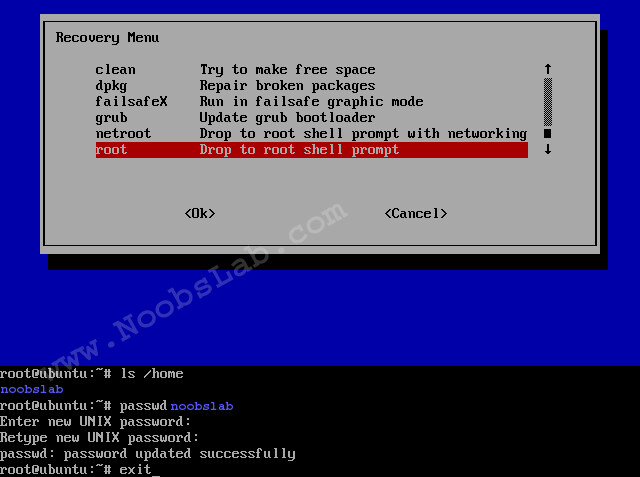
You will see the following screen. Now select "root - Drop to root shell prompt" and press "Ok"

Here is video tutorial
If you forgot your username enter this command to know:
In linux case is sensitive about username and password, If you have upper case than you need to enter same letters.
Mount root with following command:
Now Enter following command to reset your password:
For example (See the picture above):
Now enter your new password and confirm it.
Reboot pc:
That's it.
So First Step is Boot in to Recovery Mode:
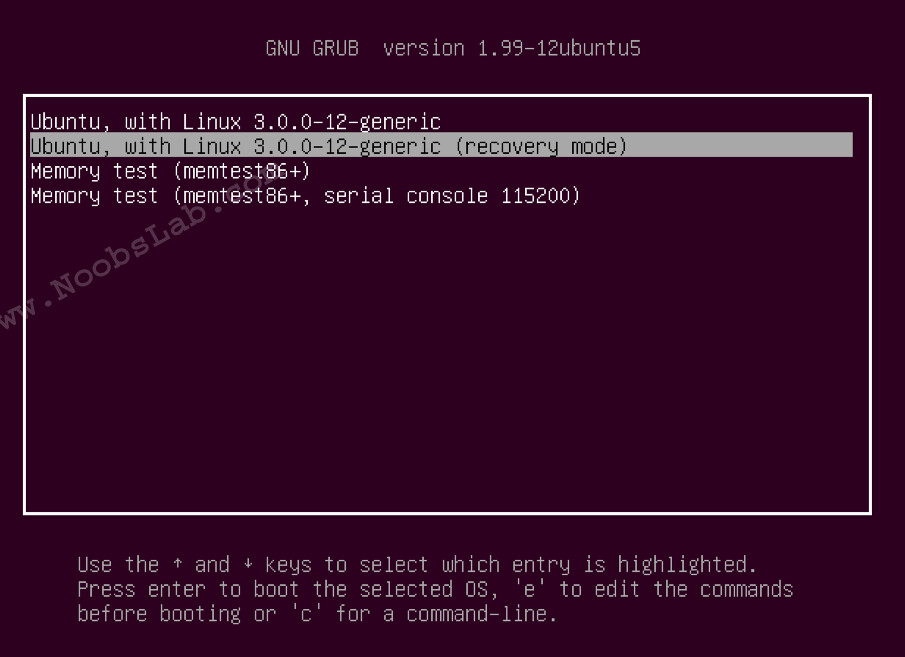
You will see the following screen. Now select "root - Drop to root shell prompt" and press "Ok"
Here is video tutorial
If you forgot your username enter this command to know:
In linux case is sensitive about username and password, If you have upper case than you need to enter same letters.
Mount root with following command:
Now Enter following command to reset your password:
For example (See the picture above):
Now enter your new password and confirm it.
Reboot pc: