Install System Monitor Applet for Gnome Shell in Ubuntu 11.10 Oneiric Ocelot/Ubuntu 12.04/Fedora

System Monitor is very useful Gnome Shell extension for displaying system information on top-panel, such as memory usage, cpu usage, network rates.
To Install System Monitor Applet in Gnome Shell (Ubuntu/Fedora) just enter the following commands in the Terminal:
Install the dependencies with the following command:
1. Now, install git to get the source.
Create a folder for git projects and git clone the source:
2. Create directory of gnome shell extensions and make a link.
3. Install the schema:
4. Install the configurator:
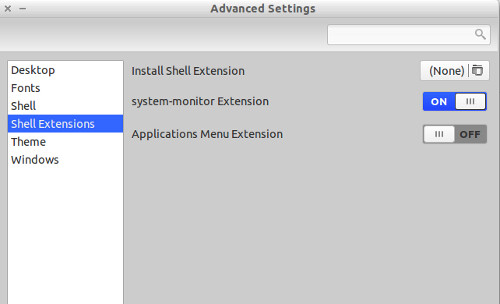
5. Now, restart gnome-shell by Alt+F2 and type 'r' and Press Enter (or log-out and log-in back). Go to Advance Settings to enable this extension. If you don't have Gnome Tweak Tool, Install it from here.


Here is the System Monitor Applet Page on GitHub
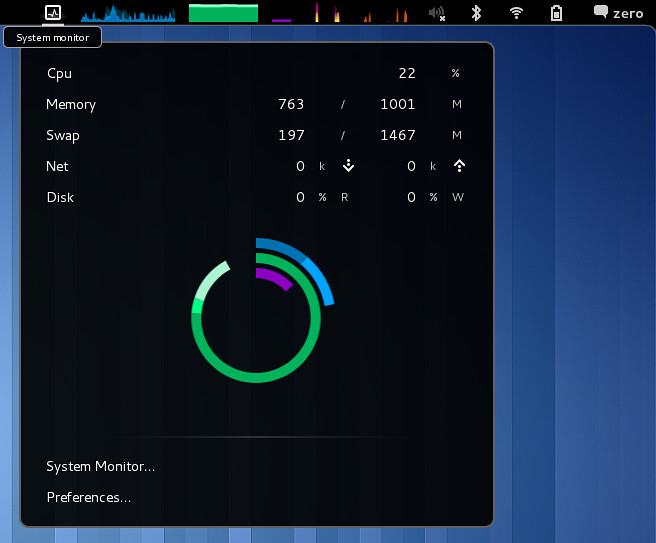
System Monitor is very useful Gnome Shell extension for displaying system information on top-panel, such as memory usage, cpu usage, network rates.
To Install System Monitor Applet in Gnome Shell (Ubuntu/Fedora) just enter the following commands in the Terminal:
Install the dependencies with the following command:
1. Now, install git to get the source.
Create a folder for git projects and git clone the source:
2. Create directory of gnome shell extensions and make a link.
3. Install the schema:
4. Install the configurator:
5. Now, restart gnome-shell by Alt+F2 and type 'r' and Press Enter (or log-out and log-in back). Go to Advance Settings to enable this extension. If you don't have Gnome Tweak Tool, Install it from here.


Here is the System Monitor Applet Page on GitHub