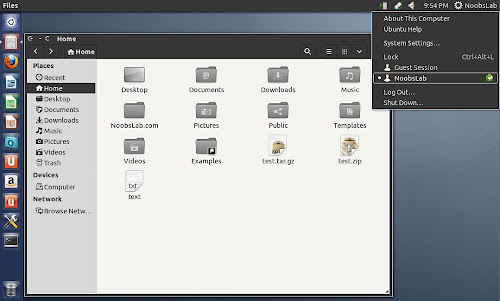
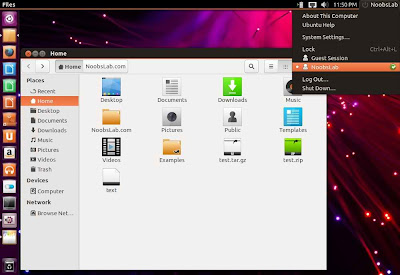
Install Ambiance-Blue theme on Ubuntu 13.04 Raring/Ubuntu 12.10 Quantal/Linux Mint 15/14 (GTK 3)

These themes are modified version of standard Ambiance theme which is available in Ubuntu as default theme. Author made some changes and give it lime-green color with dark sides of nautilus and thick content pane separators and another guy made blue color of this theme.

1st: zonColor Wallpapers used in screenshots, Also checkout Black Wallpapers
2nd: zonColor-Icons used in screenshots, Also checkout icons collection
3rd: You can use Unity Tweak ToolGnome-tweak-tool or Ubuntu-Tweak to change themes.

Theme is compatible with Ubuntu 13.04/12.10

To install Ambiance-Blue theme on Ubuntu/Linux Mint open Terminal (Press Ctrl+Alt+T) and copy the following commands in the Terminal:
That's it
Source: Ambiance Lime
BorderLine theme for Ubuntu 13.04 Raring/Ubuntu 12.10 Quantal/Ubuntu 12.04 Precise/Linux Mint 15/14/13 (GTK + Gnome Shell)

BorderLine theme is based on greybird + pieces themes. It has lines around borders of menus, file manager, dialog box and other borders. It has Gnome Shell version which is compatible with 3.6 version. This theme contains new switches which works great with indicators, new metacity which is flat, color is fixed in some areas.
borderline
borderline
borderline
Theme tested on Ubuntu 13.04/12.10 with GTK 3.6.
zonColor Icons used in screenshots, Also checkout icons collection
You can use Unity Tweak ToolGnome-tweak-tool or Ubuntu-Tweak to change themes.

To install BorderLine theme on Ubuntu/Linux Mint open Terminal (Press Ctrl+Alt+T) and copy the following commands in the Terminal:
That's it
Artyom Zorin has announced the release of Zorin OS 6.3 "Core" edition, an easy-to-use desktop Linux distribution based on Ubuntu's latest LTS (long-term support) release and enhanced with a custom start menu and other user-friendly utilities: "The Zorin OS team is pleased to announce the release of Zorin OS 6.3 Core, our operating system designed for Windows users. Zorin OS 6.3 builds on top of our popular previous release of Zorin OS 6.2 with newly updated software and a newer kernel out of the box. As Zorin OS 6.3 is based on Ubuntu 12.04, it is an LTS (long-term support) release, provided with software updates until April 2017. Users who already have Zorin OS 6, 6.1 or 6.2 Core installed can update their system using the Update Manager to avail of the aforementioned updates and improvements in 6.3." Here is the brief release announcement.
zorin os
Boot Screen

zorin os
Login Screen

zorin os
Start Menu

zorin os
Nautilus File Manager and Task-bar Tabs

zorin os free
Look Changer and QuickList

zorin os
Web Browser Chooser

Zoris OS offers:
  • Rhythmbox
  • Google Chrome
  • Dictionary
  • VLC Player
  • Cheese Webcam Booth
  • Brasero Disc Burner
  • Gimp 2.8.4
  • Empathy Instant Messaging
  • Gwibber
  • Thunderbird
  • Libreoffice
  • Shotwell Photo Manager
  • Ubuntu Tweak
  • Ubuntu Software Center

Download (MD5):
Zorin-os-6.3-core-32.iso (1.4GB) - (Mirror)
Zorin-os-6.3-core-64.iso (1.5GB) - (Mirror)
Zorin OS also Offers Premium Distribution.
Linux Mint is an Ubuntu-based distribution whose goal is to provide a more complete out-of-the-box experience by including browser plugins, media codecs, support for DVD playback, Java and other components. It also adds a custom desktop and menus, several unique configuration tools, and a web-based package installation interface. Linux Mint is compatible with Ubuntu software repositories.
Linux Mint 15 RC is has Linux kernel 3.8.x version which introduces several upgrades and various improvements, including support for UEFI Secure Boot. The new Linux Mint 15 RC Olivia has two versions, Cinnamon 1.8.x and second is Mate DE 1.6.x.
Linux Mint 15 RC has Nemo as default File Manager, Mint Display Manager (MDM), New Disk Manager (MintDisk) and many more.
Linux Mint 15
Linux Mint 15
New features at a glance:

Download:
Linux-Mint-15

Install Ubuntu Touch theme in Ubuntu 13.04 Raring/Ubuntu 12.10 Quantal/Linux Mint 15/14 (GTK)

Ubuntu touch is most awaited OS for phone, which will have great features and nice look. So the WarriorIng64 made Ubuntu touch themes for GTK. These theme are derived from Ubuntu default Ambiance and Radiance theme to give you feel of Ubuntu touch phone. Both themes are well designed and looks great with GTK 3.6.
ubuntu touch theme
ubuntu touch theme
Theme tested on Ubuntu 13.04/12.10 with GTK 3.6.
Nitrux Icons used in screenshots, Also checkout icons collection
You can use Unity Tweak ToolGnome-tweak-tool or Ubuntu-Tweak to change themes.

To install Ubuntu-Touch theme set in Ubuntu/Linux Mint open Terminal (Press Ctrl+Alt+T) and copy the following commands in the Terminal:
That's it
Install Bigfoot Red, Bigfoot Ergonomy, Eliza1 Cinnamon themes in Ubuntu 13.04 Raring/12.10 Quantal/12.04 Precise/Linux Mint 14/13

Bigfoot-Red and Bigfoot-Ergonomy cinnamon themes are created by R Jain and based on the superb Faience theme. It's inspired by Luna and KDE Glass themes. These themes makes cinnamon really cool and different.

1) Bigfoot Red

To install Bigfoot-Red theme set in Ubuntu/Linux Mint open Terminal (Press Ctrl+Alt+T) and copy the following commands in the Terminal:

2) Bigfoot Ergonomy

To install Bigfoot-Ergonomy theme set in Ubuntu/Linux Mint open Terminal (Press Ctrl+Alt+T) and copy the following commands in the Terminal:
That's it